
Figuring out when to book the cheapest flights is never easy. From the best day to book flights, to other cheap flight travel hacks, we’ve now introduced price prediction on the Skyscanner app to help you find the ultimate cheap flights.
The Skyscanner travel app has functions where you can search the cheapest day in a month to fly, as well as search ‘Everywhere’ if you don’t have a specific destination in mind. Skyscanner has now released a new feature on their travel app called price prediction. The price prediction feature allows you to view whether prices for your flight are expected to rise or fall. Here is a step-by-step guide for how you can best use Skyscanner’s price prediction app.
Step 1: Locate the tool on the travel savings app

The price prediction tool is located right on the home screen of the app. When you open the app, look for the green box that says ‘Get price predictions’ under ‘Travel Smarter’. You may need to scroll down a bit, depending on the size of your phone screen.
Step 2: Select your dates
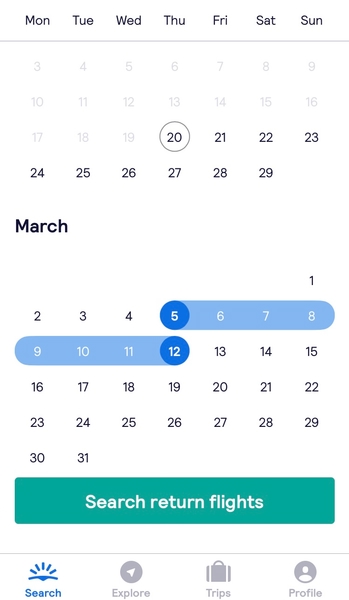
Once you click on the price prediction feature, you will land on a screen asking for your travel dates. You can click on only one date for a one-way flight, or two dates for a roundtrip flight. However, the price prediction feature for many one-way flights is unavailable due to a lack of data for those routes. You can still opt to receive notifications for price changes, as well as view the current price of the flight.
Step 3: Input your origin location on the app
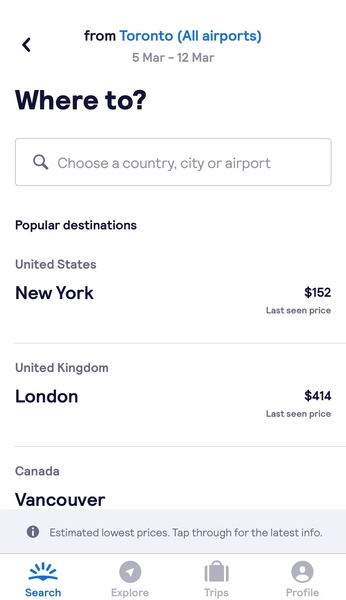
After you select your dates, you will be taken to a screen with a list of popular destinations that people fly to from your origin destination. This origin destination is automatically input based on your current location, but you can change it by clicking on it and typing in any city. You can also consider flying from nearby airports for even greater savings.
Step 4: Select your destination
Depending on your origin location, the destinations listed under ‘popular destinations’ will vary. These are some of the most commonly booked flight routes departing from your starting city, but you can also manually type in any city, country, or airport you’d like in the search bar under ‘Where to?’. If you’re not sure where you want to go, check out some places you don’t want to miss in Canada.
Step 5: View a summary of the price prediction

After all of your information is inputted, you’ll see a chart that summarizes the price prediction for your flight. The chart will show the current price of the flight, and whether the price is expected to increase or decrease. In addition to the chart, there will be a short blurb that details the specific airports that the pricing data comes from, and whether past data trends show that this is a good time to book. There will also be information about how much you could save by booking now, where prices will go in the next two weeks, and how high prices go the last week before departure.
Step 6: Book your flight or sign up for alerts

If you’re ready to book your flight, you can go straight to the flight booking page by clicking ‘view flights’. If prices look like they’ll drop in the next 1-2 weeks, or if you aren’t ready to commit to your flight yet, you can sign up to receive price alerts. Make sure your notifications are turned on for Skyscanner, or else you won’t receive the alerts. You can also unsubscribe from these alerts at any time by clicking on the ‘Turn Price Alerts Off’ button.
Step 7: Share the price prediction for your route
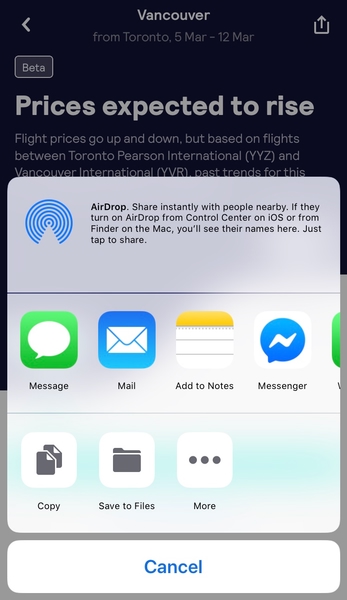
If you’re travelling with friends or family and they’re also looking for the best time to book their flight, you can share the price prediction page for your route with them. Press the share icon on the upper right corner, and send them a link to the page. The link leads to the app page, so they must have the Skyscanner app to access the link.
Now, you never have to worry again about whether you’re booking flights at the best time. Take advantage of this free Skyscanner travel savings app to afford the trip of your dreams. While you’re at it, check out the other features and flight deals the Skyscanner app has to offer!


